

VNeID (short for "Vietnam Electronic Identification") is one of the most popular and important applications on users' smartphones, containing a lot of important information that can replace hard copies of documents such as ID cards, driver's licenses, health insurance cards, etc.
Many people often use biometric features (fingerprint, face) instead of traditional passwords to quickly log in to the VNeID application. However, this may lead to you forgetting your VNeID account password and not being able to log in to VNeID in case you reinstall the application on your smartphone or switch to a new smartphone.
Below are solutions to help you handle the situation in case you forget your VNeID application login password.
Request to reset VNeID password by verifying personal information
Follow the steps below to request a VNeID login password reset directly from the app and receive a verification code via phone number:
- First, activate the VNeID application on your smartphone. From the login interface, click “Forgot password”.
At the next interface, you enter your personal identification number (your Citizen ID number) and enter your phone number. Below, select “Enter authentication information”, then press the “Send request” button.

- Next step, you fill in personal information in the corresponding box, including full name, date of birth, CCCD card issue date and press the "Continue" button.
If the information you provide is correct, a verification code will be sent to your registered phone number. Enter the received verification code into the box to confirm.

- Finally, the VNeID application will allow users to create a new password and confirm the password. Click the “Confirm” button to confirm the new password for the VNeID account.
Note: Users must create a password that is between 8 and 20 characters long; contains both lowercase and uppercase letters and numbers; and has at least one special character, including one of the characters “! @ # $ ^ * ( ) _”.
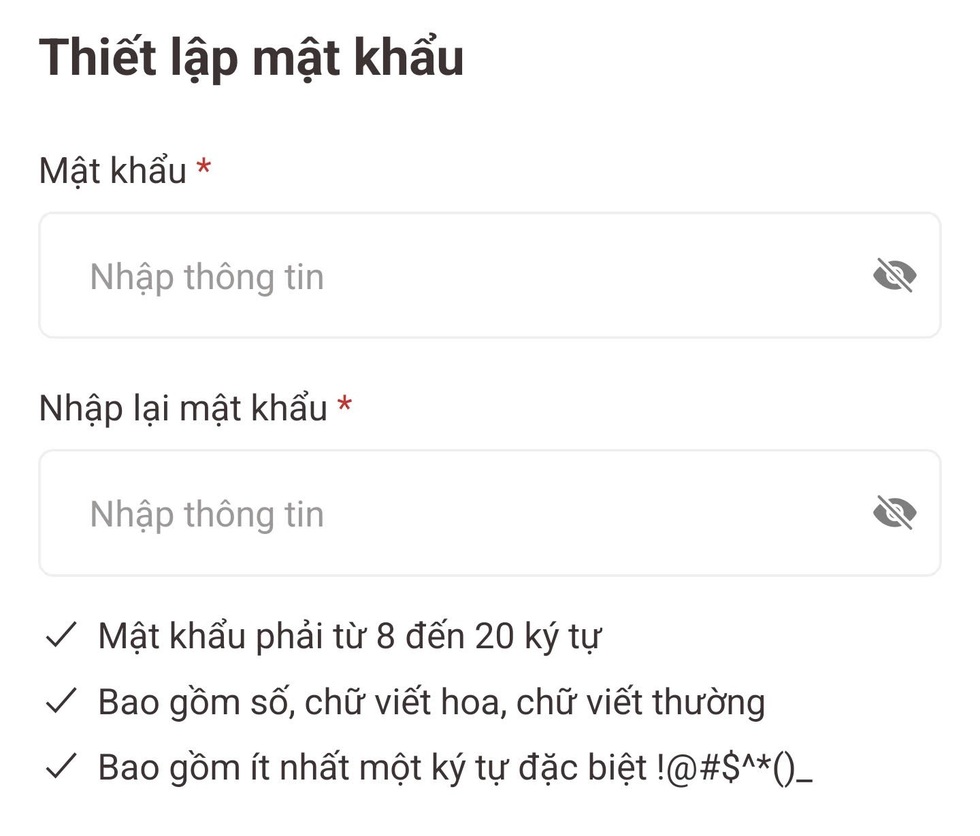
After completing the new password creation step, you will be redirected back to the VNeID login interface. You can now use the new password to log in to the application.
Request to re-issue VNeID password by scanning the Citizen Identification card with chip
In addition to the above method, you can request to reset your login password to the VNeID application by scanning your Citizen ID card via NFC protocol on your smartphone. Readers can follow these steps:
- First, activate the VNeID application on your smartphone. From the login interface, click “Forgot password”.
At the next interface that appears, you fill in your personal identification number (your Citizen ID number) and fill in your phone number as instructed above, but below select "NFC authentication with ID card/CCCD", then press the "Send request" button.
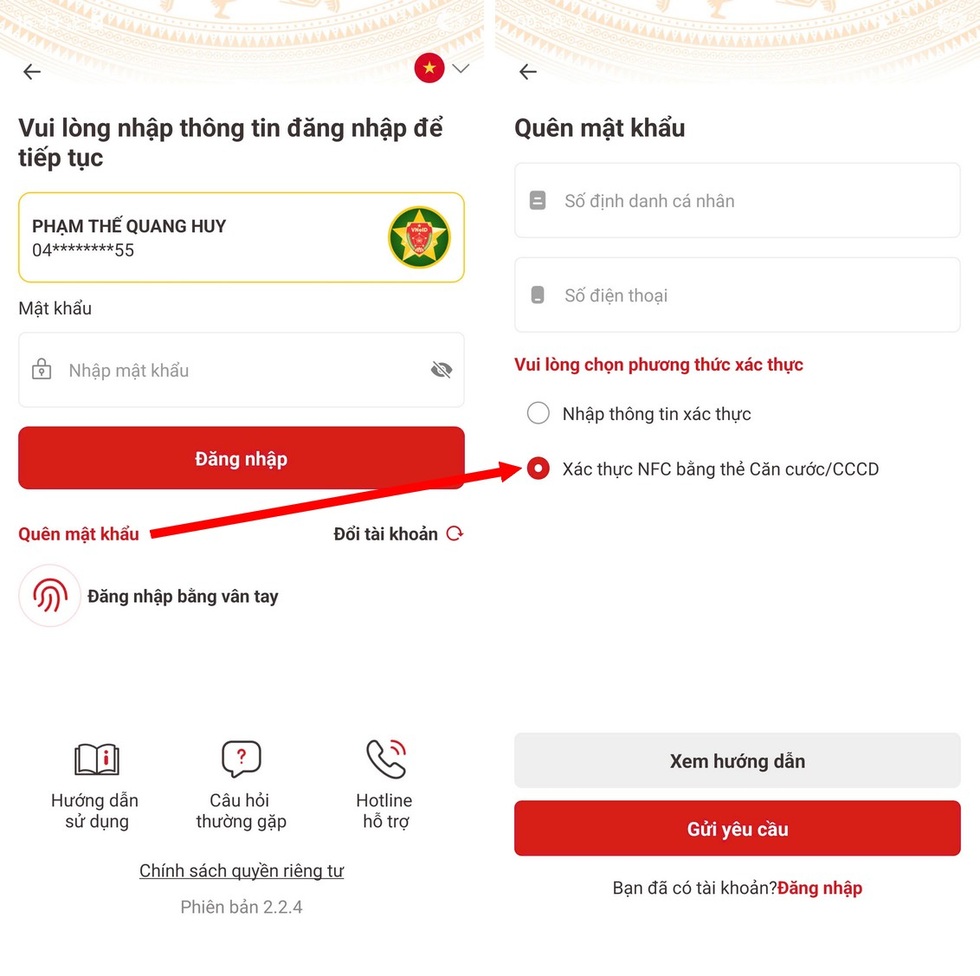
To perform the authentication step using a chip-embedded CCCD card, your smartphone must support the NFC protocol. Currently, most smartphones today support NFC connection.
Readers can follow Dan Tri 's instructions here to check if their smartphone supports NFC or not and how to place the CCCD card in the correct NFC reading position on the smartphone.
Video tutorial on how to read CCCD card via NFC protocol (Video: National Population Data Center).
After completing the authentication step with the CCCD card, an authentication code will be sent to the user's phone number. You enter this authentication code and start creating a new password for your VNeID account to be able to log in to the application.
Source: https://dantri.com.vn/cong-nghe/cach-xu-ly-trong-truong-hop-quen-mat-khau-dang-nhap-ung-dung-vneid-20251203003057624.htm


![[Photo] Cat Ba - Green island paradise](/_next/image?url=https%3A%2F%2Fvphoto.vietnam.vn%2Fthumb%2F1200x675%2Fvietnam%2Fresource%2FIMAGE%2F2025%2F12%2F04%2F1764821844074_ndo_br_1-dcbthienduongxanh638-jpg.webp&w=3840&q=75)

















































![[VIMC 40 days of lightning speed] Da Nang Port: Unity - Lightning speed - Breakthrough to the finish line](https://vphoto.vietnam.vn/thumb/402x226/vietnam/resource/IMAGE/2025/12/04/1764833540882_cdn_4-12-25.jpeg)








































Comment (0)