

 |
Setting up location tracking between two phones allows you to monitor and share each other's location on a map. Furthermore, this can be used to ensure the safety of loved ones and friends, especially in emergencies. Below are instructions on how to set up location tracking between two phones.
Detailed instructions on how to set up location tracking between two iPhones.
Step 1: Open your iPhone and search for the pre-installed Find app.
Step 2: A message will then appear asking "Allow 'Find' to use your location." Here, choose one of three options: Allow once, Allow when using the app, or Deny.
Step 3: Next, select the "Share with friends" option. Then, choose the person you want to share your location with and press "Send".
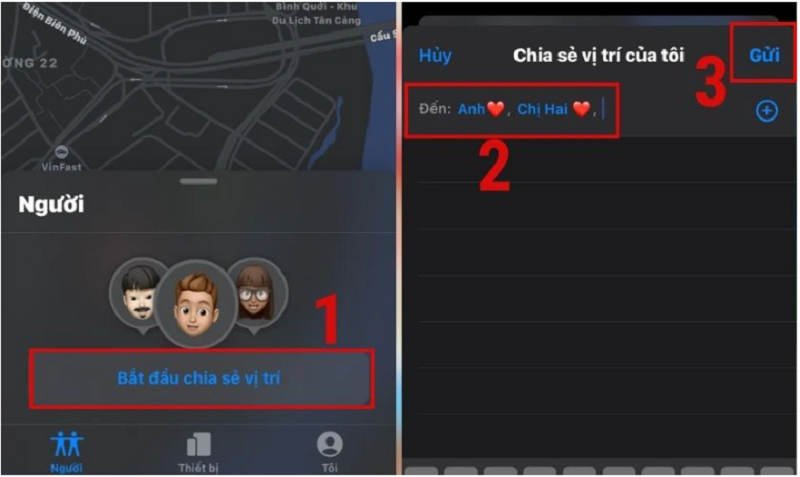 |
Step 4: Next, choose the time period for the other person to see your location. Options include: Share for one hour, Share until the end of the day, and Unlimited sharing. Finally, enable location services to complete the process.
Once location services are enabled and you've shared your location with others, you can start tracking your own and theirs. You can do this by opening the Find My app on your iPhone, then seeing where your friends are, and vice versa. They can also see where you are.
Steps to set up location tracking between two Android phones
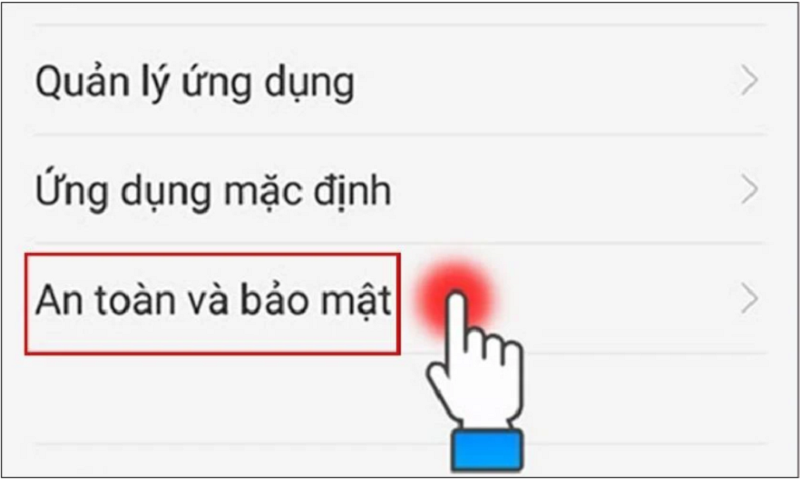
Step 1: First, open the Settings app on your phone. Then tap on Security and Privacy.
 |
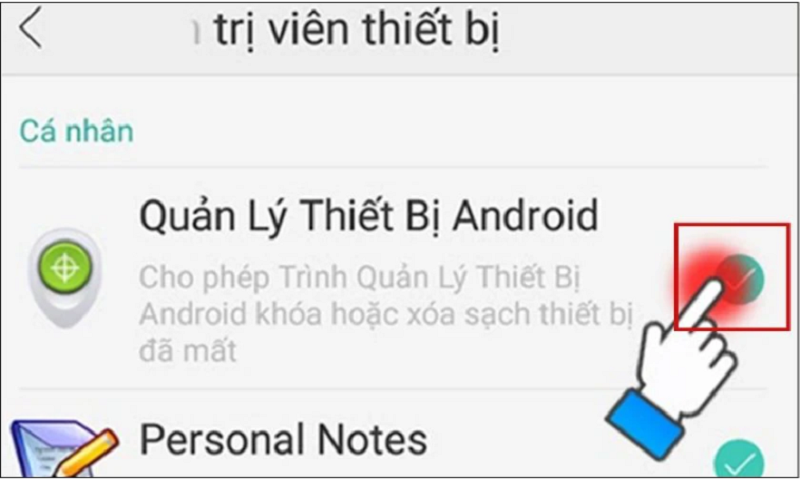
Step 2: Now, find the Device Management section and then click on Device Administrator.
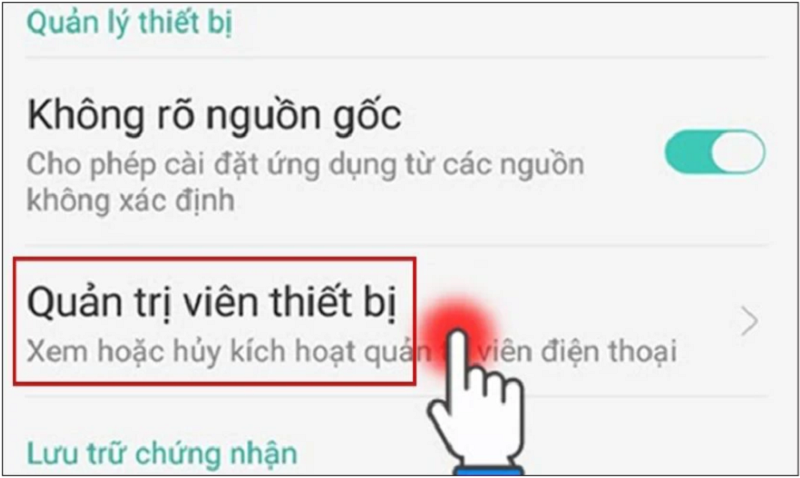 |
Step 3: Here, you allow GPS access by checking the box next to "Manage Android devices".
 |
After enabling location services on your Android phone, you can use the other device to access the Find My Device website to locate them. Log in to your Google account on the first device. The website will then help you find your location and the other person's location. Note that this service only supports Android; iOS phones will not be able to access it.
How to quickly set up location tracking between an iPhone and an Android phone.
Step 1: First, you need to install Google Maps on both your iPhone and Android devices.
Step 2: After the installation is complete, open the application on your iPhone or Android device. The system will then prompt you to enable location services.
Two options will appear on the screen: Allow when using the app or Allow once.
Step 3: Next, tap the blue arrow as shown below. Then find your location on the map and select it. The device will then display your location, and you can then tap the Share Location button.
Step 4: Here, you can adjust the sharing time yourself. This means that you and the other person will simultaneously see each other's location for only the selected number of hours. Next, you can share your location with others. You can choose to share via Gmail or click on "Other Options" and then select an application to share the location link with each other.
Source


























![[Photo] Prime Minister Pham Minh Chinh holds a phone call with the CEO of Russia's Rosatom Corporation.](/_next/image?url=https%3A%2F%2Fvphoto.vietnam.vn%2Fthumb%2F1200x675%2Fvietnam%2Fresource%2FIMAGE%2F2025%2F12%2F11%2F1765464552365_dsc-5295-jpg.webp&w=3840&q=75)














































Comment (0)