

Messenger is a messaging app from Facebook, used by millions of people worldwide . Besides regular messaging, Messenger users can also create group chats for three or more people.
While convenient, this group creation feature can sometimes cause users a lot of inconvenience, including being added to multiple chat groups and receiving constant message notifications.
To handle this situation, users can choose to leave the group chat. Specifically, in the group chat interface on Messenger, users find the group they want to leave. Then, tap on the group chat, then on the group chat name in Messenger, scroll down to find the option to leave the group chat. At this point, Messenger will ask if the user is sure they want to leave the group chat, then tap "Agree" to leave to unjoin the group chat.
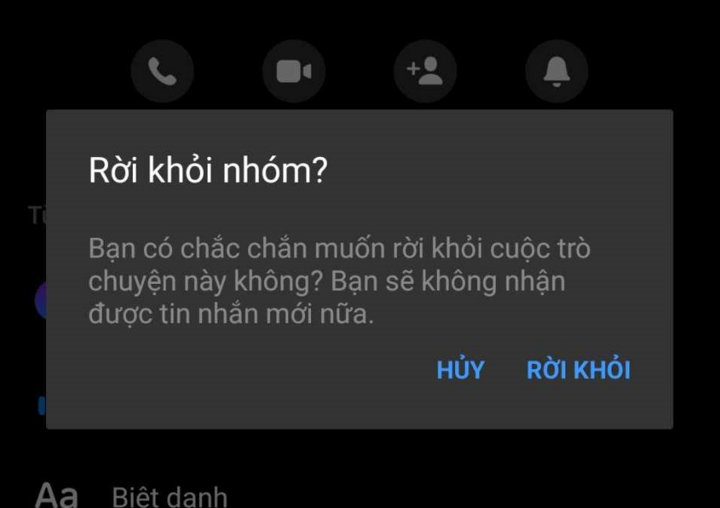
Users will no longer receive any notifications after leaving a group on Messenger.
It's important to note that leaving a Messenger group is fundamentally different from deleting a group chat. When a conversation is deleted, the user will still receive messages from other members of the group.
When a user leaves a group chat, they will no longer receive any notifications from that group. They will also no longer be able to read any messages or images posted in the group. However, other members of the group can still read messages and images that the user previously sent to the group.
Additionally, when a user leaves a group chat, Messenger will display a notification in the group so that other members can see it, and to date, there is no way for a user to leave a group completely without anyone noticing.
If you're worried about others knowing you've left a group, you can temporarily turn off group notifications to avoid being disturbed, affecting your work or private time while browsing Facebook, and it also helps save battery and data on your phone.
Here's how to turn off message notifications on Messenger groups: Access Messenger and find the group you want to mute notifications for. Next, tap on the group's name. The group interface will then appear; select "Turn off notifications" (the bell icon) and proceed with the settings to complete the process.
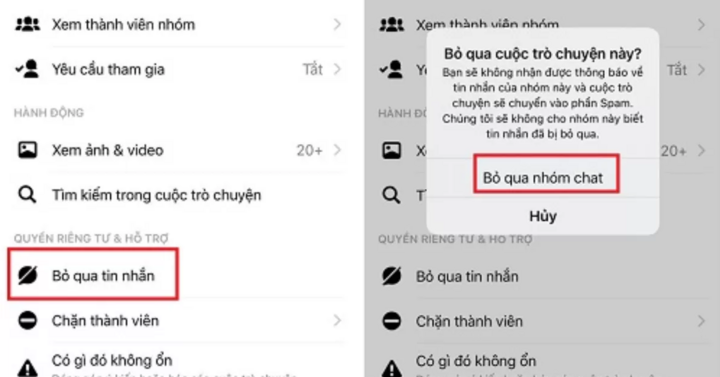
Users can skip group chats on Messenger to avoid being bothered.
Another approach is to "silently" ignore the group chat. This completely removes notifications and hides the group from your chat list.
To dismiss a group chat, on the main Messenger interface, tap and hold the conversation, then tap the menu button with three horizontal lines and select "Ignore group". In the confirmation dialog, select "Ignore" (Android) or "Ignore Group Chat" (iOS) to dismiss the group chat.
Hoa Vu (Compilation)
Source

![[Photo] Prime Minister Pham Minh Chinh holds a phone call with the CEO of Russia's Rosatom Corporation.](/_next/image?url=https%3A%2F%2Fvphoto.vietnam.vn%2Fthumb%2F1200x675%2Fvietnam%2Fresource%2FIMAGE%2F2025%2F12%2F11%2F1765464552365_dsc-5295-jpg.webp&w=3840&q=75)


![[Photo] Closing Ceremony of the 10th Session of the 15th National Assembly](/_next/image?url=https%3A%2F%2Fvphoto.vietnam.vn%2Fthumb%2F1200x675%2Fvietnam%2Fresource%2FIMAGE%2F2025%2F12%2F11%2F1765448959967_image-1437-jpg.webp&w=3840&q=75)

















































![[OFFICIAL] MISA GROUP ANNOUNCES ITS PIONEERING BRAND POSITIONING IN BUILDING AGENTIC AI FOR BUSINESSES, HOUSEHOLDS, AND THE GOVERNMENT](https://vphoto.vietnam.vn/thumb/402x226/vietnam/resource/IMAGE/2025/12/11/1765444754256_agentic-ai_postfb-scaled.png)






































Comment (0)